





00TrackPilot reporting
Know which marketing is making you money

TrackPilot is the reporting software we built for home service businesses. It follows every call and form to the estimate, the booked job and the invoice, then shows you what each channel cost and what it brought back.
Free 30-minute call. We open a live TrackPilot dashboard and show you what yours would track.
Sample data
01The short answer
What TrackPilot does for a contractor
TrackPilot is ProofPilot's reporting software for home service businesses. It pulls in leads from call tracking, web forms and ad platforms, matches each one to the customer, estimate, job and invoice in the owner's CRM, and lines that up against ad spend. The owner sees cost per lead, cost per booked job and return on ad spend for every channel, from Google Ads and Meta to local SEO, Google Business Profile and referrals. TrackPilot is included free with every full-service ProofPilot retainer, every client gets their own login, and the monthly report is built from the same numbers the owner sees.
02Why TrackPilot exists
Marketing reports aren’t for proving the agency is busy. A contractor’s report earns its keep by showing which dollars came back as booked work, channel by channel.
What a marketing report has to show before you trust it
- 01
Every Lead Keeps Its Source
A Google Ads call, a form from your site and a homeowner who came from a ChatGPT link each get tagged the moment they land. The tag rides along through the estimate, the booked job and the paid invoice, so revenue shows up under the channel that earned it.
- 02
The Proof Lives in Your CRM
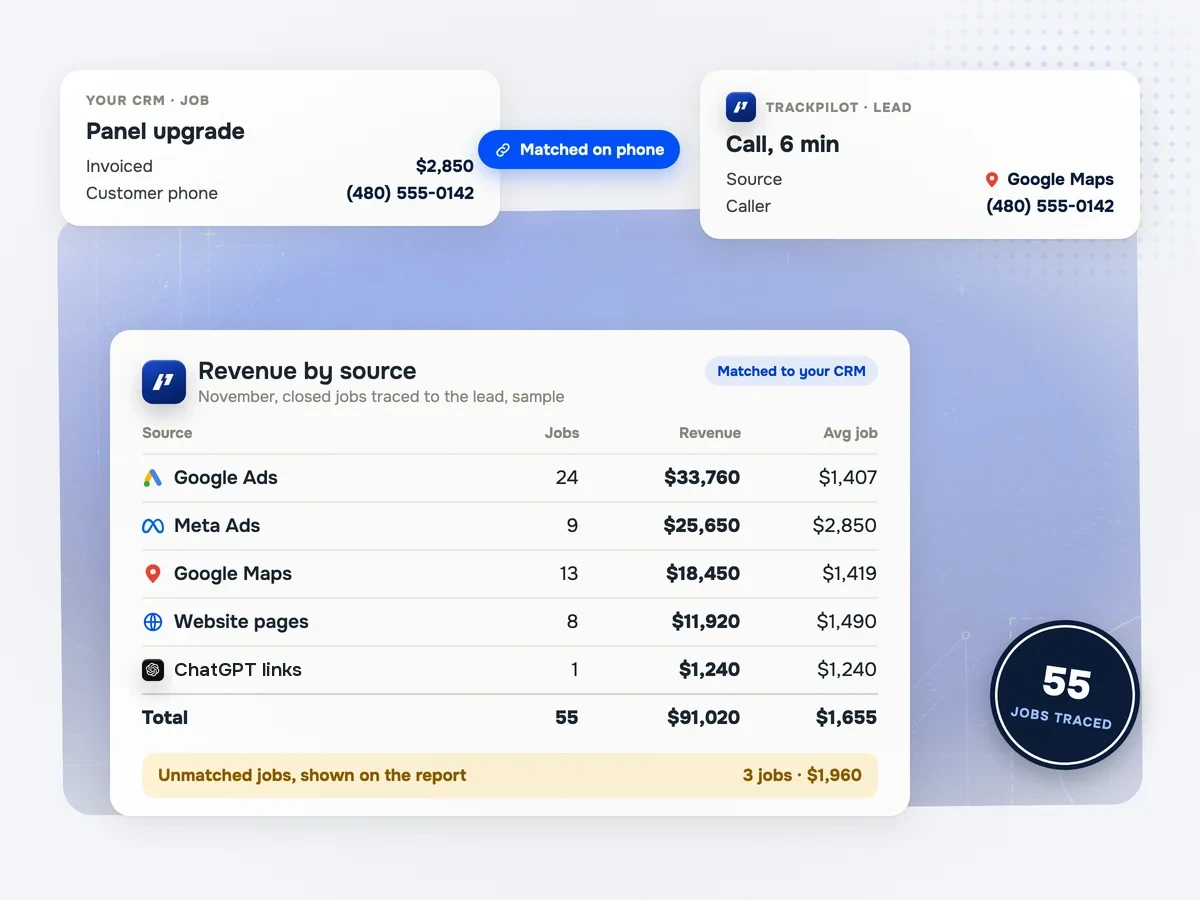
TrackPilot reads the CRM your office already runs and matches each customer to their lead on phone number. Jobs it can't match stay on the report as unmatched, so nobody quietly credits them to whichever channel looks best this month.
- 03
Every Channel Pays the Same Toll
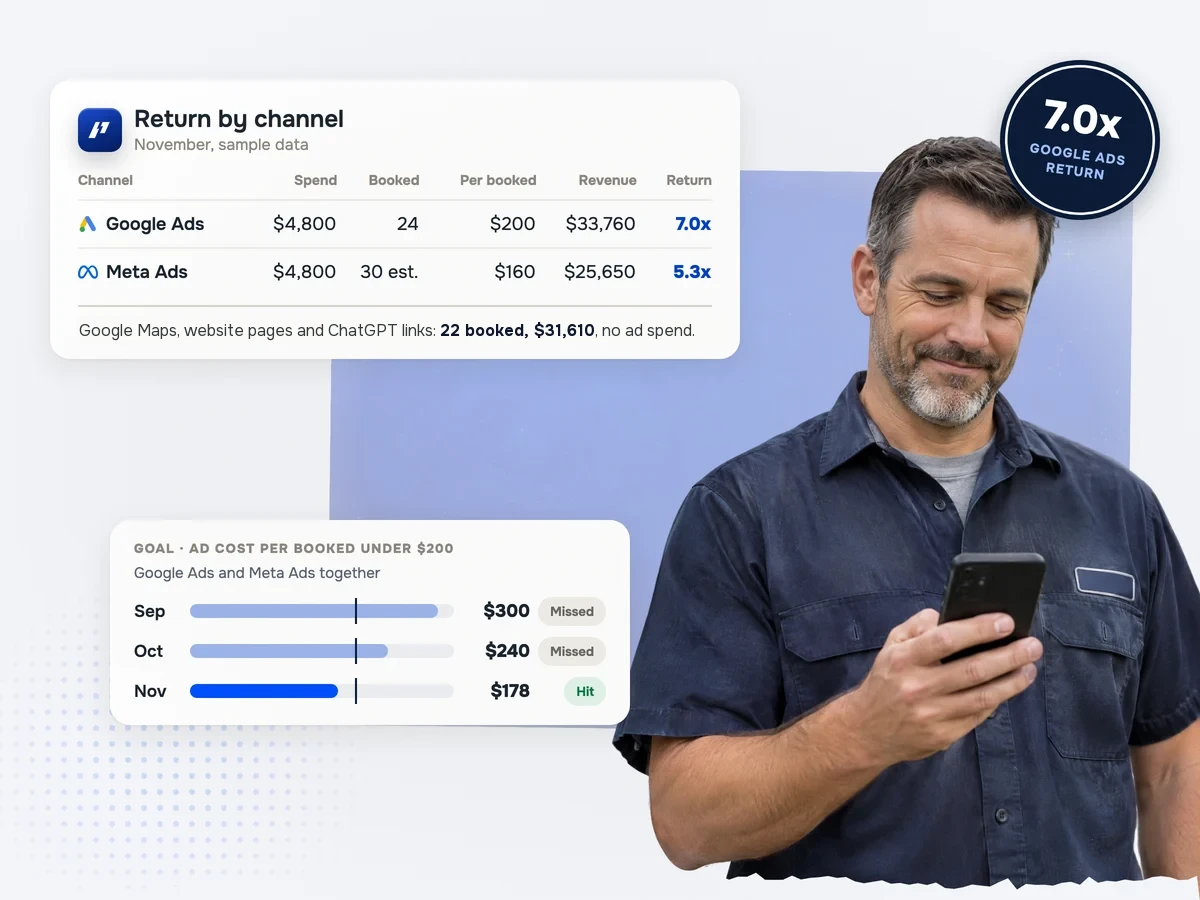
Google Ads, Meta, SEO and your Google Business Profile all answer to cost per booked job and return. In the sample month below, Google Ads booked jobs at $200 each and returned 7.0x, while Maps and the website brought in work with no ad spend at all.
- 04
Budget Follows the Booked Work
Once a month we put return by channel next to the goals we set together and move money toward what books jobs. You see the same screen we do, with your own login, so every budget call is one you can check yourself.
Lazy reporting
Lazy reporting sends a PDF of traffic, rankings and clicks with every arrow pointing up. That is like judging a crew by how many miles the trucks drove. The owner still can’t say which channel paid for itself, so next month’s budget goes to whoever pitches it best.
Smart reporting
Smart reporting starts at the invoice and works back to the lead. You see Google Ads turn $4,800 into $33,760, the jobs Maps sent with no ad spend, and the three jobs nobody could match, before anyone asks you for more budget.
Reports show a sample electrician’s November.
03How it works
How a phone call becomes a number on your report
Four steps run in the background every day. Your team keeps the phone system and CRM it already has.
TrackPilot leadSample
Call, 4 minNew lead
Tue 10:48 AM
- Source
- Google Ads
- Campaign
- Emergency repair
- Search
- “emergency electrician”
- CRM job
- Emergency repair, $480
- Campaign spend, Nov
- $1,680
Refreshed 2:15 PM · every 15 minutes
Free, 30 minutes. We walk through a live TrackPilot dashboard and show you what yours would track from the first day.
04Inside the dashboard
What you see when you log in
Three views answer the questions owners ask us most: where the leads came from, where the money came from and what each channel gave back.
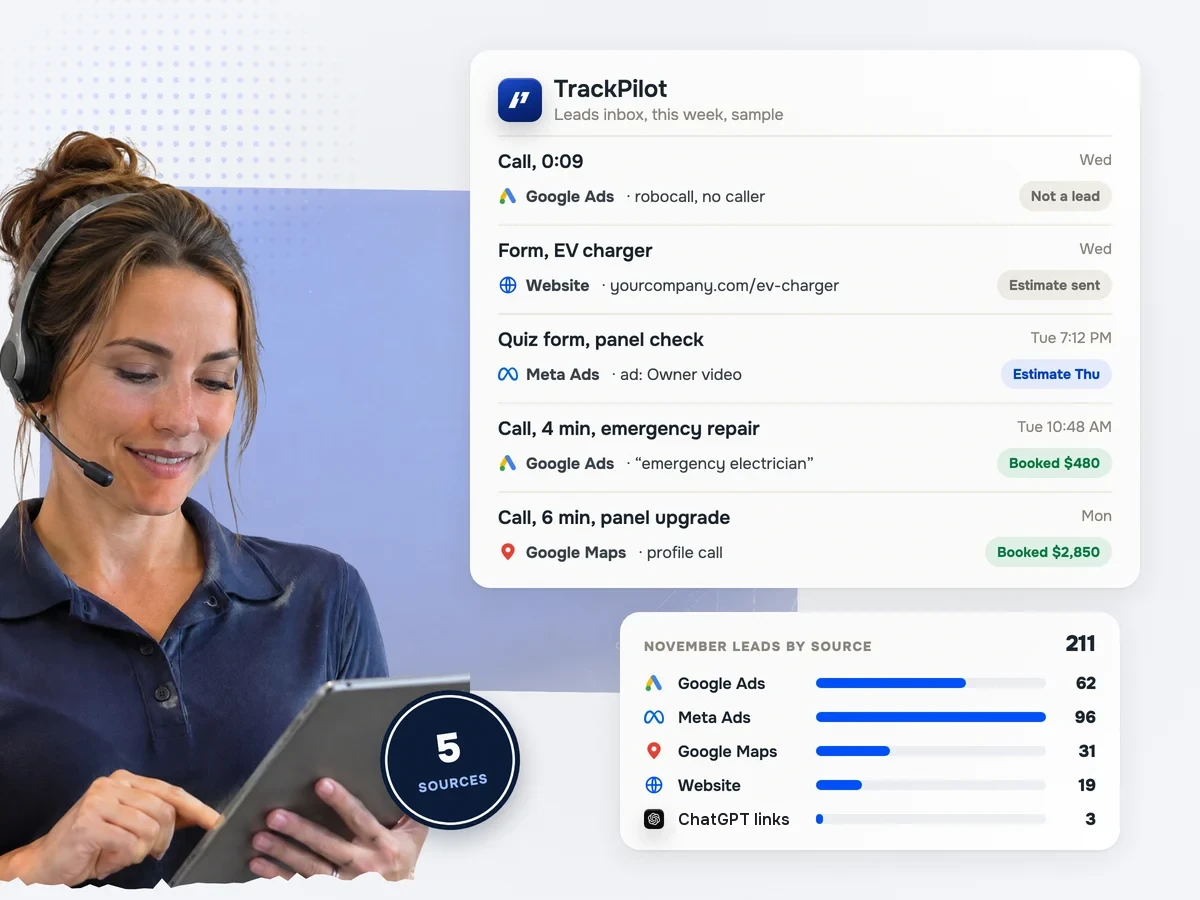
Lead sources
Where every lead came from
Leads broken out by channel, campaign and keyword, so you can see which sources send real calls and which ones send tire kickers.
- Calls, forms and ad leads in one list
- Source, campaign and keyword on every lead
- Booked work kept apart from junk inquiries
Revenue
Which channel the revenue came from
Closed jobs and invoices tie back to the lead that started them, so revenue shows up under the channel that earned it.
- Revenue by source and by service
- Average job value for each channel
- Unmatched jobs shown, never buried
Return
What each channel gives back
Spend and revenue side by side give you cost per lead, cost per booked job and return on ad spend for every channel, checked against the goals we set together.
- Return on ad spend and cost per job by channel
- Goals tracked month by month
- Spend checked against results every day
Screens show sample data.
05By trade
Set up around how your trade makes money
The tracking underneath is the same for every client. What we watch on top of it changes with the jobs that pay in your trade.
- Electricians
- Panel upgrades, EV chargers and service calls tracked by service, so you see which kind of job each channel brings in.
- Plumbers
- Emergency calls and repipes kept apart, so one big job does not hide a month of slow service calls.
- HVAC contractors
- Tune-ups, repairs and replacements tracked through each season, with cost per booked job for every stretch.
- Roofers
- Long gaps between inspection and signed contract, with every estimate tied back to the lead that started it.




06Questions
Questions owners ask about TrackPilot
Something we did not cover? Ask Matthew on a free growth call.
Does TrackPilot cost extra?
Not on a full-service retainer. TrackPilot is included free with every full-service ProofPilot retainer, with no separate software fee.
Do I have to switch CRMs to use it?
No. TrackPilot reads from the CRM you already use, including Housecall Pro, Jobber and HubSpot. Your team keeps working the way it does today.
Can I see the data myself?
Yes. You get your own login and see the same dashboard we use to make decisions. You can add logins for your office manager or partners too.
How does TrackPilot know which lead became which job?
It matches each customer in your CRM to a lead on phone number. Jobs it cannot match show up as unmatched, so the gap stays visible instead of being guessed at.
Who can see my numbers?
Only your team and ProofPilot. Every client's data is locked to that client's logins at the database level.
How long does setup take?
We connect TrackPilot during kickoff, so leads are tracked from the first day of the engagement. How much history you see before that depends on what your CRM and call tracking already hold.

07Next step
See TrackPilot running on real numbers
On a free growth call I will walk you through TrackPilot with live data and show you what your own dashboard would track. If your current setup already tells you cost per booked job by channel, I will tell you that too.
Matthew Anderson, founder, ProofPilot. Mesa, Arizona
30 minutes, free. You leave knowing what your marketing should cost per booked job, whether or not we work together.
- 1Pick a timeBook a slot that suits you. It takes a minute.
- 2We show you TrackPilot live on the callA working dashboard, from the lead to the invoice, and what yours would track from the first day.
- 3If it fits, a plan and a priceThe channels we would run, the goals we would hold them to and a monthly price, month to month.
Our revenue jumped 13.6x in one year. ProofPilot changed everything.Anthony, Owner, All Thingz Electric. He can see which dollars produce jobs, and SEO returns 18.8x.$210per booked estimate from lead genPower Route Electric & Plumbing. Every channel reports into one view, and 40% of leads turn into booked jobs.
Works well alongside